

Capabilities
Transcription
Speech-to-text with 95%+ accuracy in 50+ languages.
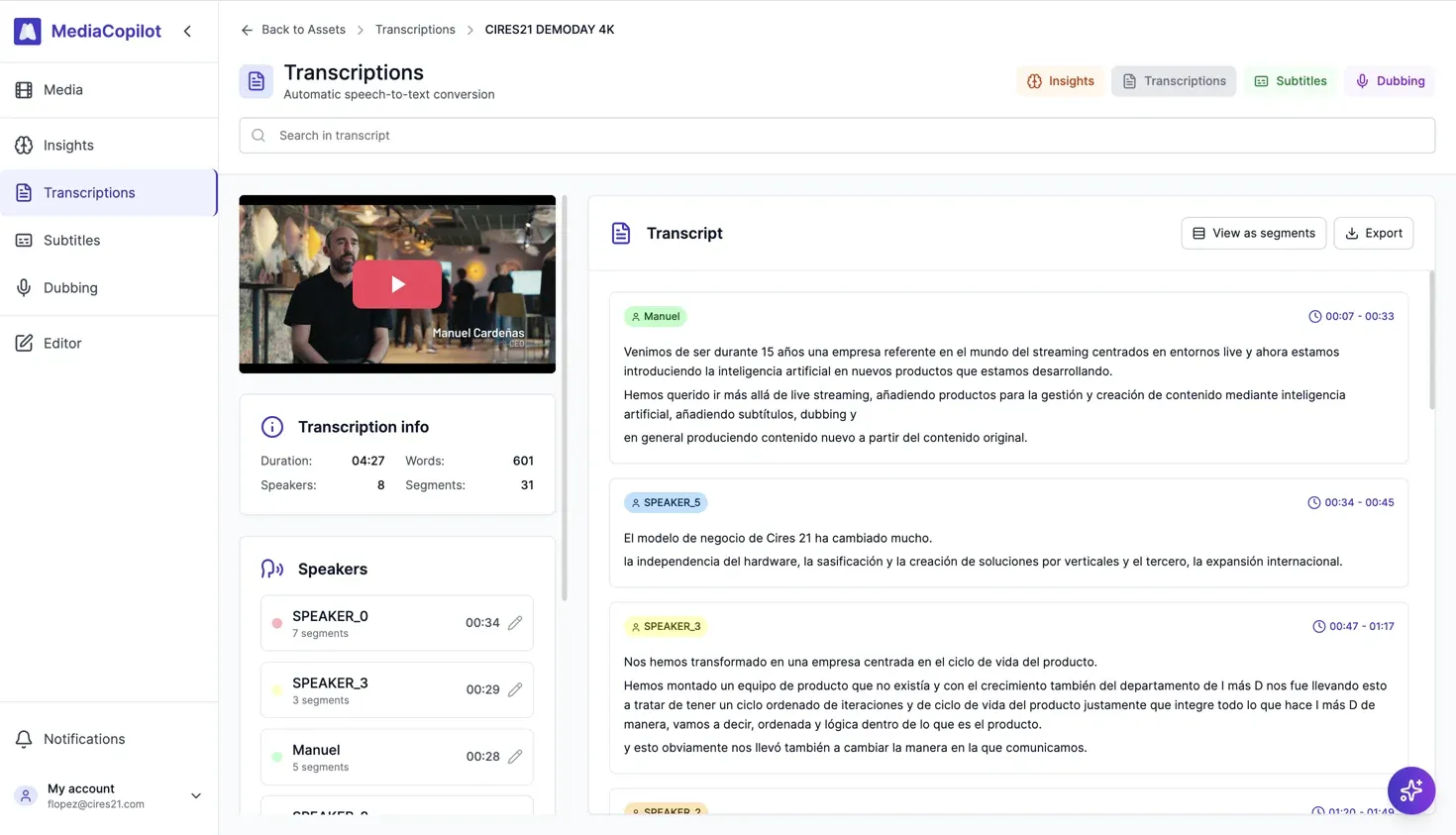
How it works
Upload
Upload a video or audio file, or import from a connected cloud storage (Amazon S3, Azure Blob).
Configure
Choose the source language or let it auto-detect. Optionally add keywords to boost accuracy for domain-specific terms.
Review
View the transcript with speaker labels and timestamps. Play back audio synced to each word.
Export
Export in multiple formats for your editing or publishing workflow.
Key features
- 95%+ accuracy for major languages.
- Automatic language detection.
- Speaker recognition — identifies and labels different speakers.
- 50+ languages supported.
- Keyword boosting — improve accuracy for technical terms and proper nouns.
Export formats
Export your transcripts in the format that fits your workflow:
| Format | Extension | Use case |
|---|---|---|
| SRT | .srt | Video players, editing software |
| VTT | .vtt | Web players, streaming platforms |
| STL | .stl | Broadcast (EBU standard) |
| JSON | .json | Custom integrations, API workflows |
| Plain text | .txt | Scripts, documents |
Supported languages
MediaCopilot supports 50+ languages for transcription, including:
- English
- Spanish
- French
- German
- Portuguese
- Italian
- Arabic
- Chinese (Mandarin)
- Japanese
- Korean
- Dutch
- Russian
- Turkish
- Polish
- Swedish
- Norwegian
- Danish
- Finnish
- Greek
- Hebrew
- Hindi
- Thai
- Vietnamese
- Indonesian
- Malay
- Czech
- Romanian
- Hungarian
- Ukrainian
- Catalan
And many more. The list is continuously expanding.
FAQ
Most common formats: MP4, MOV, MKV, MP3, WAV, AAC.
95%+ for major languages in clear audio. Background noise, heavy accents, or overlapping speakers may reduce accuracy.
Yes. MediaCopilot processes the audio track of your file and requires spoken dialogue to generate a transcript. Files with only music or ambient sound will not produce meaningful results.